---
title: "Creating a Ghost Shader with TSL"
description: "Building a spectral \"ghost arm\" effect using Three.js TSL, the node-based shader system that ships with Three.js's WebGPU renderer."
canonical_url: "https://alvarosabu.dev/blog/creating-a-ghost-shader-with-tsl/"
---

> Index of every page on this site: [llms.txt](https://alvarosabu.dev/llms.txt)

<scene-wrapper caption="Ghost shader I made for my rpg-like game">
<blog-tsl-ghost-demo>


</blog-tsl-ghost-demo>
</scene-wrapper>

Have you ever wondered how games like <magic-link label="Divinity Original Sin 2">


</magic-link>

 or <magic-link label="Baldur's Gate 3">


</magic-link>

 create their spectral ghost effects? In this post I'll show you how to create a similar effect using <magic-link label="ThreeJS">


</magic-link>

 TSL, the node-based shader system that ships with Three.js's WebGPU renderer.

<div className="grid,grid-cols-2,gap-8,items-center">
<div>

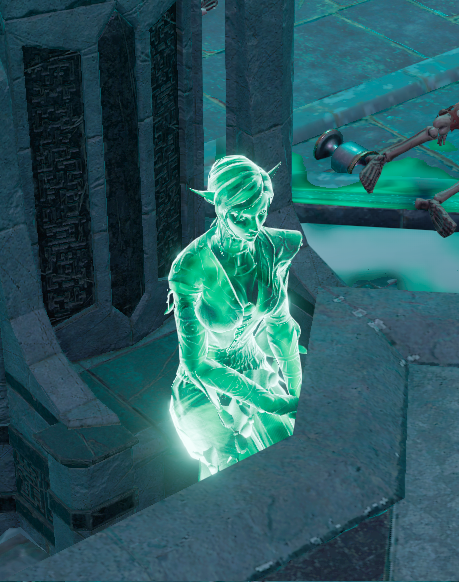
We want a material that:

1. **Glows at the edges**: bright silhouette, transparent center
2. **Emits a spectral cyan light** to feel otherworldly
3. **Is fully transparent**: no solid surface, just energy
4. **Renders from both sides**
</div>

<div className="rounded-lg,aspect-square,overflow-hidden,border-1,border-muted,dark:border-transparent">

![Spirit of Wits](https://divinityoriginalsin2.wiki.fextralife.com/file/Divinity-Original-Sin-2/spirit_of_wits.png)

</div>
</div>

## The Fresnel Effect

The Fresnel effect is the foundation of this shader. In the real world, surfaces reflect more light at glancing angles. Think of how a lake looks transparent when you look straight down but mirrors the sky at the horizon.

Our ghost material exploits this: where the surface faces you directly, it's transparent. Where it faces away, at the edges, it glows.

<blog-fresnel-diagram>


</blog-fresnel-diagram>

### The formula

The core of the effect is a dot product between the surface normal **N** and the view direction **V**:

<span className="katex">
<span className="katex-mathml">
<math xmlns="http://www.w3.org/1998/Math/MathML">
<semantics>
<mrow>
<mi>

F

</mi>

<mo>

=

</mo>

<mo stretchy="false">

(

</mo>

<mn>

1

</mn>

<mo>

−

</mo>

<mi mathvariant="bold">

N

</mi>

<mo>

⋅

</mo>

<mi mathvariant="bold">

V

</mi>

<msup>
<mo stretchy="false">

)

</mo>

<mi>

p

</mi>
</msup>
</mrow>

<annotation encoding="application/x-tex">

F = (1 - \mathbf{N} \cdot \mathbf{V})^p

</annotation>
</semantics>
</math>
</span>

<span className="katex-html" ariaHidden="true">
<span className="base">
<span className="strut" style="height:0.6833em;">


</span>

<span className="mord,mathnormal" style="margin-right:0.13889em;">

F

</span>

<span className="mspace" style="margin-right:0.2778em;">


</span>

<span className="mrel">

=

</span>

<span className="mspace" style="margin-right:0.2778em;">


</span>
</span>

<span className="base">
<span className="strut" style="height:1em;vertical-align:-0.25em;">


</span>

<span className="mopen">

(

</span>

<span className="mord">

1

</span>

<span className="mspace" style="margin-right:0.2222em;">


</span>

<span className="mbin">

−

</span>

<span className="mspace" style="margin-right:0.2222em;">


</span>
</span>

<span className="base">
<span className="strut" style="height:0.6861em;">


</span>

<span className="mord,mathbf">

N

</span>

<span className="mspace" style="margin-right:0.2222em;">


</span>

<span className="mbin">

⋅

</span>

<span className="mspace" style="margin-right:0.2222em;">


</span>
</span>

<span className="base">
<span className="strut" style="height:1em;vertical-align:-0.25em;">


</span>

<span className="mord,mathbf" style="margin-right:0.01597em;">

V

</span>

<span className="mclose">

)

</span>

<span className="msupsub">
<span className="vlist-t">
<span className="vlist-r">
<span className="vlist" style="height:0.6644em;">
<span style="top:-3.063em;margin-right:0.05em;">
<span className="pstrut" style="height:2.7em;">


</span>

<span className="sizing,reset-size6,size3,mtight">
<span className="mord,mathnormal,mtight">

p

</span>
</span>
</span>
</span>
</span>
</span>
</span>
</span>
</span>
</span>
</span>


- **N** is the surface normal at the fragment (which way the surface is pointing)
- **V** is the direction from the fragment toward the camera
- **p** is the falloff sharpness; higher values tighten the glow to a thinner rim

When you look head-on, N and V are nearly parallel, so N·V is close to 1 and F drops to 0 (transparent). At grazing angles they're near-perpendicular, N·V approaches 0 and F approaches 1 (bright edge).

The ghost shader uses `p = 1.5`, then passes the result through a `smoothstep` to reshape the curve. We'll cover that in the TSL implementation below.

## Building It Step by Step

### Step 1: A Plain Sphere

Before any shader magic, here's our starting mesh: a plain `MeshPhysicalNodeMaterial` with default settings.

<scene-wrapper caption="Step 1: Baseline, a plain opaque sphere">
<blog-fresnel-step-demo :step="1">


</blog-fresnel-step-demo>
</scene-wrapper>

```ts
import { MeshPhysicalNodeMaterial } from 'three/webgpu'

const material = new MeshPhysicalNodeMaterial()
```

### Step 2: Fresnel Opacity

Now we compute the Fresnel factor and pipe it into `opacityNode`. The center of the sphere becomes transparent, the edges glow.

```ts
import { color, dot, normalView, float, positionViewDirection, vec3, pow, sub, smoothstep } from 'three/tsl'
import { DoubleSide } from 'three'
import { MeshPhysicalNodeMaterial } from 'three/webgpu'

const NdotV = dot(normalView, positionViewDirection).abs()
const fresnelFactor = pow(sub(float(1.0), NdotV), float(1.5)).mul(0.9)
const shaped = smoothstep(float(0.0), float(1.0), fresnelFactor)

const material = new MeshPhysicalNodeMaterial()
material.transparent = true
material.depthWrite = false
material.side = DoubleSide
material.opacityNode = shaped
```

Each line maps directly to the formula <span className="katex">
<span className="katex-mathml">
<math xmlns="http://www.w3.org/1998/Math/MathML">
<semantics>
<mrow>
<mi>

F

</mi>

<mo>

=

</mo>

<mo stretchy="false">

(

</mo>

<mn>

1

</mn>

<mo>

−

</mo>

<mi mathvariant="bold">

N

</mi>

<mo>

⋅

</mo>

<mi mathvariant="bold">

V

</mi>

<msup>
<mo stretchy="false">

)

</mo>

<mi>

p

</mi>
</msup>
</mrow>

<annotation encoding="application/x-tex">

F = (1 - \mathbf{N} \cdot \mathbf{V})^p

</annotation>
</semantics>
</math>
</span>

<span className="katex-html" ariaHidden="true">
<span className="base">
<span className="strut" style="height:0.6833em;">


</span>

<span className="mord,mathnormal" style="margin-right:0.13889em;">

F

</span>

<span className="mspace" style="margin-right:0.2778em;">


</span>

<span className="mrel">

=

</span>

<span className="mspace" style="margin-right:0.2778em;">


</span>
</span>

<span className="base">
<span className="strut" style="height:1em;vertical-align:-0.25em;">


</span>

<span className="mopen">

(

</span>

<span className="mord">

1

</span>

<span className="mspace" style="margin-right:0.2222em;">


</span>

<span className="mbin">

−

</span>

<span className="mspace" style="margin-right:0.2222em;">


</span>
</span>

<span className="base">
<span className="strut" style="height:0.6861em;">


</span>

<span className="mord,mathbf">

N

</span>

<span className="mspace" style="margin-right:0.2222em;">


</span>

<span className="mbin">

⋅

</span>

<span className="mspace" style="margin-right:0.2222em;">


</span>
</span>

<span className="base">
<span className="strut" style="height:1em;vertical-align:-0.25em;">


</span>

<span className="mord,mathbf" style="margin-right:0.01597em;">

V

</span>

<span className="mclose">

)

</span>

<span className="msupsub">
<span className="vlist-t">
<span className="vlist-r">
<span className="vlist" style="height:0.6644em;">
<span style="top:-3.063em;margin-right:0.05em;">
<span className="pstrut" style="height:2.7em;">


</span>

<span className="sizing,reset-size6,size3,mtight">
<span className="mord,mathnormal,mtight">

p

</span>
</span>
</span>
</span>
</span>
</span>
</span>
</span>
</span>
</span>
</span>

 :

- `normalView` is **N** in the formula, the surface normal in view (camera) space.
- `positionViewDirection` is **V** in the formula, the direction from the fragment toward the camera.
- `dot(normalView, positionViewDirection).abs()` computes **N·V**. It gives 1 when you're looking straight at the surface, 0 at grazing angles. `.abs()` handles back faces.
- `sub(float(1.0), NdotV)` is **(1 - N·V)**. It inverts the value: now edges = 1, center = 0.
- `pow(..., float(1.5))` applies the exponent **p**, which controls the falloff sharpness. `1.5` gives a medium rim, `3.0` tightens it, `0.5` spreads it wider.
- `smoothstep(0, 1, fresnelFactor)` is not in the base formula, but it reshapes the raw ramp with an S-curve so the transition feels organic rather than linear.

`depthWrite = false` is critical here: without it, the transparent regions still occlude objects behind them. `DoubleSide` ensures both faces render so the sphere looks consistent from any angle.

<scene-wrapper caption="Step 2: Fresnel opacity, edges visible and center transparent">
<blog-fresnel-step-demo :step="2">


</blog-fresnel-step-demo>
</scene-wrapper>

### Step 3: Adding Emission

The shape is right, but there's no light yet. We set `colorNode` to black (no diffuse surface) and drive `emissiveNode` with the same Fresnel shape multiplied by a spectral cyan.

```ts
material.colorNode = vec3(0, 0, 0)
material.emissiveNode = color('#88ccff').mul(shaped).mul(12.0)
```

The `12.0` multiplier pushes the emission into HDR range, so values above 1.0 will bloom when a post-processing pass is active.

<scene-wrapper caption="Step 3: Cyan emission on the edges">
<blog-fresnel-step-demo :step="3">


</blog-fresnel-step-demo>
</scene-wrapper>

### Step 4: Bloom

The HDR emission values are there but the glow looks flat without bloom. Adding a post-processing bloom pass makes the light bleed into surrounding pixels.

<scene-wrapper caption="Step 4: Full ghost effect with bloom">
<blog-fresnel-step-demo :step="4">


</blog-fresnel-step-demo>
</scene-wrapper>

```ts
import { bloom } from 'three/addons/tsl/display/BloomNode.js'
// Add to your post-processing pipeline
const bloomPass = bloom(scenePassColor)
bloomPass.strength.value = 0.5
bloomPass.threshold.value = 0.1
```

### Step 5: Ethereal Noise

The ghost looks clean. Almost *too* clean. Real spectral energy isn't uniform, it flickers and shifts. We can break up the perfect Fresnel rim with animated fractal noise using TSL's built-in `mx_fractal_noise_float` node.

```ts
import { mix, mx_fractal_noise_float, positionLocal, time, uniform } from 'three/tsl'

const noiseScale = uniform(float(1.5))
const noiseSpeed = uniform(float(0.3))
const noiseIntensity = uniform(float(0.5))

const animatedPos = positionLocal.add(time.mul(noiseSpeed))
const noiseValue = mx_fractal_noise_float(animatedPos.mul(noiseScale), 3, 2, 0.5)
const noiseFactor = mix(
  float(1.0),
  noiseValue.remapClamp(float(-1), float(1), float(0), float(1)),
  noiseIntensity,
)
const shapedWithNoise = shaped.mul(noiseFactor)
```

Here's what each piece does:

- `positionLocal.add(time.mul(noiseSpeed))` offsets the noise sample position over time so the pattern drifts slowly across the surface.
- `mx_fractal_noise_float(..., 3, 2, 0.5)` generates multi-octave fractal noise. The `3` octaves add detail layers, `2` is the lacunarity (frequency multiplier per octave), and `0.5` is the diminishment (amplitude reduction per octave).
- `remapClamp(-1, 1, 0, 1)` maps the raw noise output from `[-1, 1]` to `[0, 1]` so it can modulate opacity without going negative.
- `mix(1.0, remapped, noiseIntensity)` blends between "no noise" (1.0) and the noise value. At `0.5` intensity, you get subtle variation without losing the Fresnel shape entirely.

Then replace `shaped` with `shapedWithNoise` in both `opacityNode` and `emissiveNode`:

```ts
material.opacityNode = shapedWithNoise
material.emissiveNode = color('#88ccff').mul(shapedWithNoise).mul(12.0)
```

<scene-wrapper caption="Step 5: Fractal noise breaks up the uniform rim">
<blog-fresnel-step-demo :step="5">


</blog-fresnel-step-demo>
</scene-wrapper>

## The Complete Material

Putting it all together in a reusable function:

```ts
import {
  color,
  dot,
  float,
  mix,
  mx_fractal_noise_float,
  normalView,
  positionLocal,
  positionViewDirection,
  pow,
  smoothstep,
  sub,
  time,
  vec3,
} from 'three/tsl'
import { DoubleSide, MeshPhysicalNodeMaterial } from 'three/webgpu'

const GHOST_COLOR = '#88ccff'
const GLOW_STRENGTH = 12.0
const FRESNEL_POWER = 1.5
const NOISE_SCALE = 1.5
const NOISE_SPEED = 0.3
const NOISE_INTENSITY = 0.5

export function ghostMaterial() {
  // Fresnel: edges bright, core dark
  const NdotV = dot(normalView, positionViewDirection).abs()
  const fresnelFactor = pow(sub(float(1.0), NdotV), float(FRESNEL_POWER)).mul(0.9)
  const shaped = smoothstep(float(0.0), float(1.0), fresnelFactor)

  // Ethereal noise
  const animatedPos = positionLocal.add(time.mul(float(NOISE_SPEED)))
  const noiseValue = mx_fractal_noise_float(animatedPos.mul(float(NOISE_SCALE)), 3, 2, 0.5)
  const noiseFactor = mix(
    float(1.0),
    noiseValue.remapClamp(float(-1), float(1), float(0), float(1)),
    float(NOISE_INTENSITY),
  )
  const shapedWithNoise = shaped.mul(noiseFactor)

  const material = new MeshPhysicalNodeMaterial()
  material.transparent = true
  material.depthWrite = false
  material.side = DoubleSide
  material.colorNode = vec3(0, 0, 0)
  material.opacityNode = shapedWithNoise
  material.emissiveNode = color(GHOST_COLOR).mul(shapedWithNoise).mul(GLOW_STRENGTH)
  return material
}
```

## Sitemap

See the full [sitemap](https://alvarosabu.dev/sitemap.md) for all pages.
