Animating Grass with Wind in TSL 🌬️
A static grass field is a rug. The moment it moves, it becomes a place. This is the second post in the grass series, and it does one thing: take the instanced blade from part 1 and put it in the wind.
Part 1 ended on a promise. We sculpted a tipness attribute into the blade, 0 at the base, 0.7 at the mid vertices, 1 at the tip, and used it to fake ambient occlusion. I said it had a second job: if you displace each vertex horizontally proportionally to it, the base stays planted, the middle leans, and the tip travels furthest, so the blade bends instead of shearing. That's the whole plan. Let's cash it in.
Same two references as before, both GLSL: Bruno Simon's folio-2025 wind and the Antaeus AR article. We'll translate the ideas to TSL.
A Wind Field, Not Per-Blade Jitter
The naive instinct is to give every blade its own little oscillation: sin(time + random). Please don't 😅. Real wind is meant to be coherent, a gust rolls across the field and neighboring blades lean together. That coherence is the whole reason wind reads as wind and not as static.
So wind isn't a per-blade property. It's a field: a function of world position and time that every blade samples at its anchor. Blades close together sample nearly the same value and move together; blades a gust apart move differently. We get that for free from noise.
Here's the field, translated from Bruno's Wind.js:
const WIND_ANGLE = Math.PI * 0.6
const windDirection = uniform(new Vector2(Math.sin(WIND_ANGLE), Math.cos(WIND_ANGLE)))
const windPositionFrequency = uniform(0.5)
const windStrength = uniform(0.45)
const windTimeFrequency = uniform(0.5)
const windLocalTime = uniform(0)

const windOffset = Fn(([worldXZ]) => {
  const p = worldXZ.mul(windPositionFrequency)
  const n1 = mx_noise_float(p.mul(0.2).add(windDirection.mul(windLocalTime)))
  const n2 = mx_noise_float(p.mul(0.1).add(windDirection.mul(windLocalTime.mul(0.2)))).mul(0.5)
  const intensity = n1.add(n2).add(0.4)
  return windDirection.mul(intensity).mul(windStrength)
})
Three ideas are doing the work here.
A single direction. Wind has a heading. We derive a 2D direction on the ground plane from one angle and reuse it everywhere: to scroll the noise, and as the axis every blade leans along. Change the angle uniform and the whole field re-orients.
Scrolling the noise. Adding direction × localTime to the sample position slides the noise field across the ground in the wind direction. That scroll is what turns a frozen noise texture into a gust traveling across the meadow.
direction × localTime to the sample position slides the whole field downwind, a gust travelling across the meadow Two octaves, deliberately mismatched. Notice n1 and n2 use different spatial frequencies (0.2 vs 0.1) and different time scales (localTime vs localTime × 0.2). This matters. One octave alone reads as a single wave marching across the field in lockstep, obviously periodic. A slow, broad octave (the whole field surging) layered with a faster, finer one (smaller ripples riding on top) breaks the pattern and reads as natural turbulence. If you copy only one thing from this post, copy the "different frequency and time scale" part.
The downwind lean
That .add(0.4) is small and easy to miss, and it's the difference between grass and seaweed.
mx_noise_float is centered on zero, so without the constant, intensity swings symmetrically positive and negative: the field oscillates around its rest pose, blades rocking back and forth through vertical. Real wind doesn't do that. Wind bows vegetation persistently downwind and then modulates that bow. Adding a positive bias keeps intensity mostly on one side of zero, so the field has a resting lean in the wind direction with gusts on top. Tiny constant, completely changes the character.
A note on
mx_noise_float: Bruno's original samples a perlin texture (texture(perlin, uv)). We already leaned onmx_noise_floatin part 1 for height patches, and it's the better fit here too, no texture to load or bind, it's centered on zero (a texture is in[0, 1], so his GLSL subtracts0.5), and it's evaluated procedurally on the GPU. Same idea, one less asset.
Advancing Time
windLocalTime is a uniform, so something has to move it. In a  TresJS component that's
 useLoop:
const { onBeforeRender } = useLoop()
onBeforeRender(({ delta }) => {
  windLocalTime.value += delta * windTimeFrequency.value * windStrength.value
})
The subtle bit is multiplying by windStrength. Time advances faster when the wind is stronger. So the strength uniform does double duty: it scales how far blades bend and how fast the field scrolls. Turn strength up and the wind doesn't just push harder, it moves quicker, which is exactly how a picking-up wind feels. Decouple them and a "strong" wind that crawls looks wrong.
Step 1: Sway
Now the payoff. In part 1's positionNode, right after we place the blade at its anchor, we sample the field and push the vertex:
// taller blades sway more → × height. ×2 is just a visual gain
const windVec = windOffset(anchor).mul(height).mul(2).toVar()
pos.addAssign(vec3(windVec.x.mul(tipness), 0, windVec.y.mul(tipness)))
Two things ride along. Multiplying by height means taller blades sway more, short stubble barely moves while the tall stuff whips, which is both physically right and reads great. And the whole offset is weighted by tipness: the base vertices (tipness = 0) don't move at all, the tip (tipness = 1) moves the full amount, the mids move partway. The blade curves along its length instead of sliding rigidly or hinging at the root.
Sampling at the anchor (constant per instance) rather than per-vertex means the whole blade reads the same gust, so it moves as one coherent object.
Let it run and it already looks alive. But watch a strong gust closely, especially the tall blades: they stretch. The tip flies out sideways and the blade visibly gets longer, like a rubber band. That's because we only moved the vertex in xz. A blade is (roughly) inextensible: if the tip swings out horizontally while the base stays planted, the blade would have to grow to reach the new spot. Ours happily does. It looks like taffy.
Step 2: Bend, Not Stretch
A bent blade keeps its length. If the tip moves horizontally by some amount w while the base is fixed, the tip has to drop to compensate, tracing an arc rather than a straight slide.
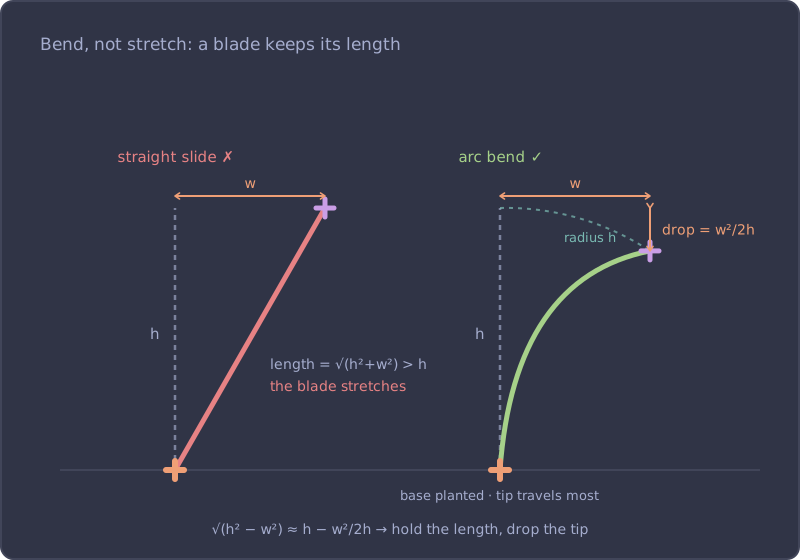
The exact arc length is annoying to solve in a shader, but we don't need exact. For a small horizontal displacement on a blade of height , keeping the length constant means the tip drops by approximately:
That's the leading term of the arc-length correction (straight from Pythagoras: ). Cheap, and visually indistinguishable from the real thing at grass scale. In TSL:
// arc-length approximation: as the tip leans out, it drops to keep the blade's length
const droop = windVec.dot(windVec).div(height.mul(2)).min(height.mul(0.35))
pos.y.subAssign(droop.mul(tipness).mul(tipness))
windVec.dot(windVec) is (cheaper than a length, no square root). Dividing by gives the drop. Two guards make it behave:
.min(height.mul(0.35))clamps the drop so a violent gust bends the blade over but never folds it through the ground.tipness²(not justtipness) weights the drop. Squaring biases it hard toward the tip, so the base and mids barely dip while the tip does most of the falling. That's what gives the profile its curve, a blade bent like a bow, rather than a straight blade tilted like a lever.
Same wind, same strength, but now the blades bend and hold their length. The taffy is gone. Orbit down to grazing angle and you can watch individual blades bow into a gust and spring back.
The Wind, Wired In
Dropped into part 1's createGrass material, the whole addition to the vertex stage is small:
material.positionNode = Fn(() => {
  // …anchor, yaw, height and local blade placement from part 1…
  const pos = vec3(local.x.add(anchor.x), local.y, local.z.add(anchor.y)).toVar()

  // wind: sample the shared field at the anchor, weight by tipness so the blade curves
  const windVec = windOffset(anchor).mul(height).mul(2).toVar()
  pos.addAssign(vec3(windVec.x.mul(tipness), 0, windVec.y.mul(tipness)))

  // bend, don't stretch: drop the tip to keep the blade's length
  const droop = windVec.dot(windVec).div(height.mul(2)).min(height.mul(0.35))
  pos.y.subAssign(droop.mul(tipness).mul(tipness))

  return pos
})()
No new geometry, no new attributes. The tipness we already had carries the curve, and the wind field is a single shared Fn sampled once per blade. Everything else, instancing, the diffuse map, the AO gradient, is untouched from part 1.
What's Next: Trample
The field breathes now, but it ignores you. Walk a character through it and the blades pass straight through their legs. The next post adds a trample system: a character stamps into a small render target as it moves, the grass reads that map to flatten under foot and part radially around the interactor, and a recovery pass springs the blades back up once you've passed. It reuses the exact same tipness weighting, one attribute, three effects.
Resources
- Creating a Grass Field with TSL, part 1: instancing, the anchor trick, and the diffuse map
- Bruno Simon's folio-2025 Wind.js, the GLSL wind field this translates
- Bruno Simon's folio-2025 Grass.js, where the sway is applied
- Three.js TSL documentation