Creating a Ghost Shader with TSL
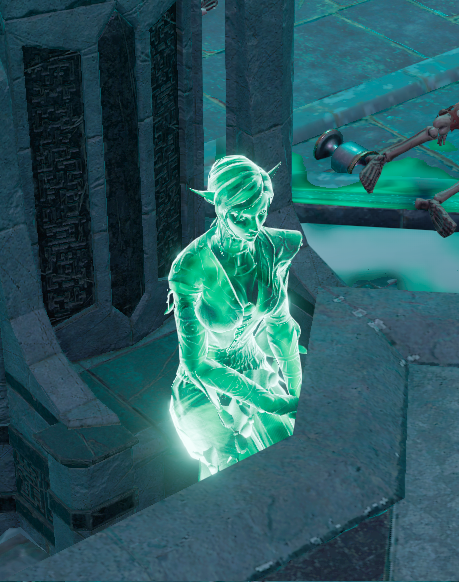
Have you ever wondered how games like Divinity Original Sin 2 or
Baldur's Gate 3 create their spectral ghost effects? In this post I'll show you how to create a similar effect using
ThreeJS TSL, the node-based shader system that ships with Three.js's WebGPU renderer.
We want a material that:
- Glows at the edges: bright silhouette, transparent center
- Emits a spectral cyan light to feel otherworldly
- Is fully transparent: no solid surface, just energy
- Renders from both sides
The Fresnel Effect
The Fresnel effect is the foundation of this shader. In the real world, surfaces reflect more light at glancing angles. Think of how a lake looks transparent when you look straight down but mirrors the sky at the horizon.
Our ghost material exploits this: where the surface faces you directly, it's transparent. Where it faces away, at the edges, it glows.
The formula
The core of the effect is a dot product between the surface normal N and the view direction V:
- N is the surface normal at the fragment (which way the surface is pointing)
- V is the direction from the fragment toward the camera
- p is the falloff sharpness; higher values tighten the glow to a thinner rim
When you look head-on, N and V are nearly parallel, so N·V is close to 1 and F drops to 0 (transparent). At grazing angles they're near-perpendicular, N·V approaches 0 and F approaches 1 (bright edge).
The ghost shader uses p = 1.5, then passes the result through a smoothstep to reshape the curve. We'll cover that in the TSL implementation below.
Building It Step by Step
Step 1: A Plain Sphere
Before any shader magic, here's our starting mesh: a plain MeshPhysicalNodeMaterial with default settings.
import { MeshPhysicalNodeMaterial } from 'three/webgpu'

const material = new MeshPhysicalNodeMaterial()
Step 2: Fresnel Opacity
Now we compute the Fresnel factor and pipe it into opacityNode. The center of the sphere becomes transparent, the edges glow.
import { color, dot, normalView, float, positionViewDirection, vec3, pow, sub, smoothstep } from 'three/tsl'
import { DoubleSide } from 'three'
import { MeshPhysicalNodeMaterial } from 'three/webgpu'

const NdotV = dot(normalView, positionViewDirection).abs()
const fresnelFactor = pow(sub(float(1.0), NdotV), float(1.5)).mul(0.9)
const shaped = smoothstep(float(0.0), float(1.0), fresnelFactor)

const material = new MeshPhysicalNodeMaterial()
material.transparent = true
material.depthWrite = false
material.side = DoubleSide
material.opacityNode = shaped
Each line maps directly to the formula :
normalViewis N in the formula, the surface normal in view (camera) space.positionViewDirectionis V in the formula, the direction from the fragment toward the camera.dot(normalView, positionViewDirection).abs()computes N·V. It gives 1 when you're looking straight at the surface, 0 at grazing angles..abs()handles back faces.sub(float(1.0), NdotV)is (1 - N·V). It inverts the value: now edges = 1, center = 0.pow(..., float(1.5))applies the exponent p, which controls the falloff sharpness.1.5gives a medium rim,3.0tightens it,0.5spreads it wider.smoothstep(0, 1, fresnelFactor)is not in the base formula, but it reshapes the raw ramp with an S-curve so the transition feels organic rather than linear.
depthWrite = false is critical here: without it, the transparent regions still occlude objects behind them. DoubleSide ensures both faces render so the sphere looks consistent from any angle.
Step 3: Adding Emission
The shape is right, but there's no light yet. We set colorNode to black (no diffuse surface) and drive emissiveNode with the same Fresnel shape multiplied by a spectral cyan.
material.colorNode = vec3(0, 0, 0)
material.emissiveNode = color('#88ccff').mul(shaped).mul(12.0)
The 12.0 multiplier pushes the emission into HDR range, so values above 1.0 will bloom when a post-processing pass is active.
Step 4: Bloom
The HDR emission values are there but the glow looks flat without bloom. Adding a post-processing bloom pass makes the light bleed into surrounding pixels.
import { bloom } from 'three/addons/tsl/display/BloomNode.js'
// Add to your post-processing pipeline
const bloomPass = bloom(scenePassColor)
bloomPass.strength.value = 0.5
bloomPass.threshold.value = 0.1
Step 5: Ethereal Noise
The ghost looks clean. Almost too clean. Real spectral energy isn't uniform, it flickers and shifts. We can break up the perfect Fresnel rim with animated fractal noise using TSL's built-in mx_fractal_noise_float node.
import { mix, mx_fractal_noise_float, positionLocal, time, uniform } from 'three/tsl'

const noiseScale = uniform(float(1.5))
const noiseSpeed = uniform(float(0.3))
const noiseIntensity = uniform(float(0.5))

const animatedPos = positionLocal.add(time.mul(noiseSpeed))
const noiseValue = mx_fractal_noise_float(animatedPos.mul(noiseScale), 3, 2, 0.5)
const noiseFactor = mix(
  float(1.0),
  noiseValue.remapClamp(float(-1), float(1), float(0), float(1)),
  noiseIntensity,
)
const shapedWithNoise = shaped.mul(noiseFactor)
Here's what each piece does:
positionLocal.add(time.mul(noiseSpeed))offsets the noise sample position over time so the pattern drifts slowly across the surface.mx_fractal_noise_float(..., 3, 2, 0.5)generates multi-octave fractal noise. The3octaves add detail layers,2is the lacunarity (frequency multiplier per octave), and0.5is the diminishment (amplitude reduction per octave).remapClamp(-1, 1, 0, 1)maps the raw noise output from[-1, 1]to[0, 1]so it can modulate opacity without going negative.mix(1.0, remapped, noiseIntensity)blends between "no noise" (1.0) and the noise value. At0.5intensity, you get subtle variation without losing the Fresnel shape entirely.
Then replace shaped with shapedWithNoise in both opacityNode and emissiveNode:
material.opacityNode = shapedWithNoise
material.emissiveNode = color('#88ccff').mul(shapedWithNoise).mul(12.0)
The Complete Material
Putting it all together in a reusable function:
import {
  color,
  dot,
  float,
  mix,
  mx_fractal_noise_float,
  normalView,
  positionLocal,
  positionViewDirection,
  pow,
  smoothstep,
  sub,
  time,
  vec3,
} from 'three/tsl'
import { DoubleSide, MeshPhysicalNodeMaterial } from 'three/webgpu'

const GHOST_COLOR = '#88ccff'
const GLOW_STRENGTH = 12.0
const FRESNEL_POWER = 1.5
const NOISE_SCALE = 1.5
const NOISE_SPEED = 0.3
const NOISE_INTENSITY = 0.5

export function ghostMaterial() {
  // Fresnel: edges bright, core dark
  const NdotV = dot(normalView, positionViewDirection).abs()
  const fresnelFactor = pow(sub(float(1.0), NdotV), float(FRESNEL_POWER)).mul(0.9)
  const shaped = smoothstep(float(0.0), float(1.0), fresnelFactor)

  // Ethereal noise
  const animatedPos = positionLocal.add(time.mul(float(NOISE_SPEED)))
  const noiseValue = mx_fractal_noise_float(animatedPos.mul(float(NOISE_SCALE)), 3, 2, 0.5)
  const noiseFactor = mix(
    float(1.0),
    noiseValue.remapClamp(float(-1), float(1), float(0), float(1)),
    float(NOISE_INTENSITY),
  )
  const shapedWithNoise = shaped.mul(noiseFactor)

  const material = new MeshPhysicalNodeMaterial()
  material.transparent = true
  material.depthWrite = false
  material.side = DoubleSide
  material.colorNode = vec3(0, 0, 0)
  material.opacityNode = shapedWithNoise
  material.emissiveNode = color(GHOST_COLOR).mul(shapedWithNoise).mul(GLOW_STRENGTH)
  return material
}