Intro to TSL
Creating shaders has always been challenging, even seasoned developers have never wrote GLSL code by themselves. If you've spent time fighting with onBeforeCompile() or rebuilding entire rendering pipelines with ShaderMaterial you know what I'm talking about.
TSL (Three.js Shader Language) offers a new approach, a node based alternative to GLSL which integrates directly with Three.js material system.
This post will serve as a short introduction to TSL, how to get started and why is a great tool for creative web developers.
GLSL limitations
If you ever wanted to customize a material in  Threejs beyond what the built-in properties offered, you had two relative painful options:
Option 1: onBeforeCompile() hack to replace the shader string before the material compiles:
  material.onBeforeCompile = (shader) => {
    shader.uniforms.uTime = { value: 0 }
    shader.vertexShader = shader.vertexShader.replace(
      '#include <begin_vertex>',
      `
        #include <begin_vertex>
        transformed.y += sin(position.x * 10.0 + uTime) * 0.1;
      `
    )
  }
Yikes 🥴
Option 2: Create a ShaderMaterial from scratch
import vertexShader from './shaders/vertex.glsl'
import fragmentShader from './shaders/fragment.glsl'
import { Color, ShaderMaterial } from 'three'

const material = new ShaderMaterial({
  vertexShader,
  fragmentShader,
  uniforms: {
    uColorA: { value: new Color('#6366f1') },
    uColorB: { value: new Color('#ec4899') },
  },
})
Both approaches share the same fundamental issues:
- Strings, not code — GLSL lives in template literals. No IDE support, no typechecking, errors only at GPU compile time
- Fragile, easily broken if Three.js changes the shader code internally.
- LOL, debugging 🥲
- Manually managing uniforms and attributes, no automatic injection.
- Not composable — you can't easily combine two shader effects or reuse pieces across materials
TSL to the rescue
TSL is a node based JavaScript API for creating shaders. It is designed to replace the string concatenation madness into composable shader operations using functions.
import { mix, positionLocal, uniform } from 'three/tsl'
import { Color, MeshStandardNodeMaterial } from 'three/webgpu'

const material = new MeshStandardNodeMaterial()

const topColor = uniform(new Color('#6366f1'))
const bottomColor = uniform(new Color('#ec4899'))

const factor = positionLocal.y.mul(0.5).add(0.5)

material.colorNode = mix(bottomColor, topColor, factor)
Isn't that beautiful 🥹? No more strings templates. Just typescript code describing what is happening. Is no longer imperative code but composable building blocks that you can combine, reuse, and more important, inspect.
How TSL works
The magic behind TSL is the concept of nodes — Objects that represent shaders properties and their operations.
Why nodes? Because node-based shading is already the standard in the 3D and game industry. Blender's Editor, Unreal's Material Editor, Unity's Shader Graph all work this way. TSL brings that same mental model to the web.
To visualize it better, lets take the gradient between #6366F1 and #EC4899 shader example we used before and replicate it in Blender:
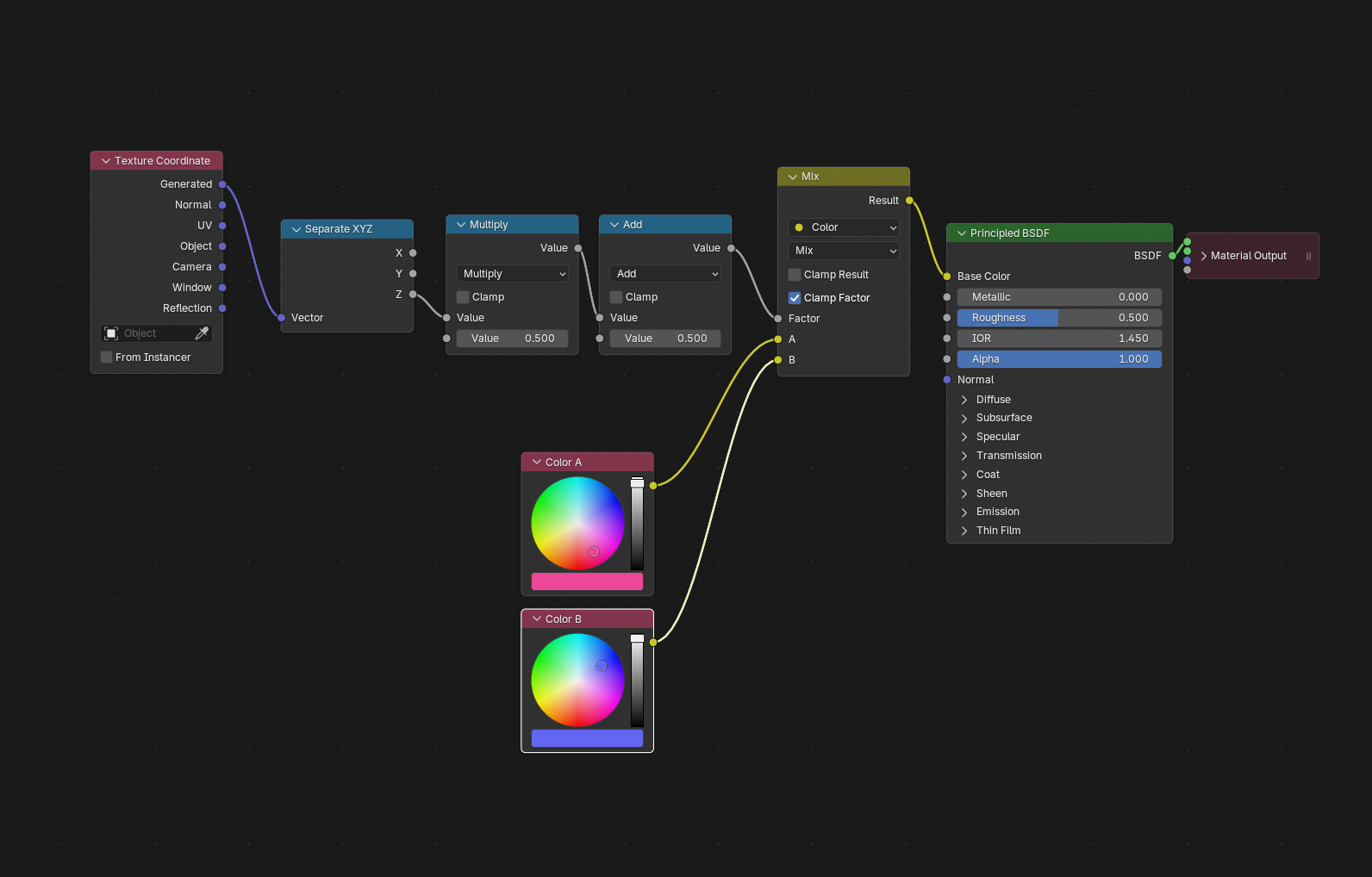
Three.js uses Y-up while Blender uses Z-up, so the vertical axis in TSL is
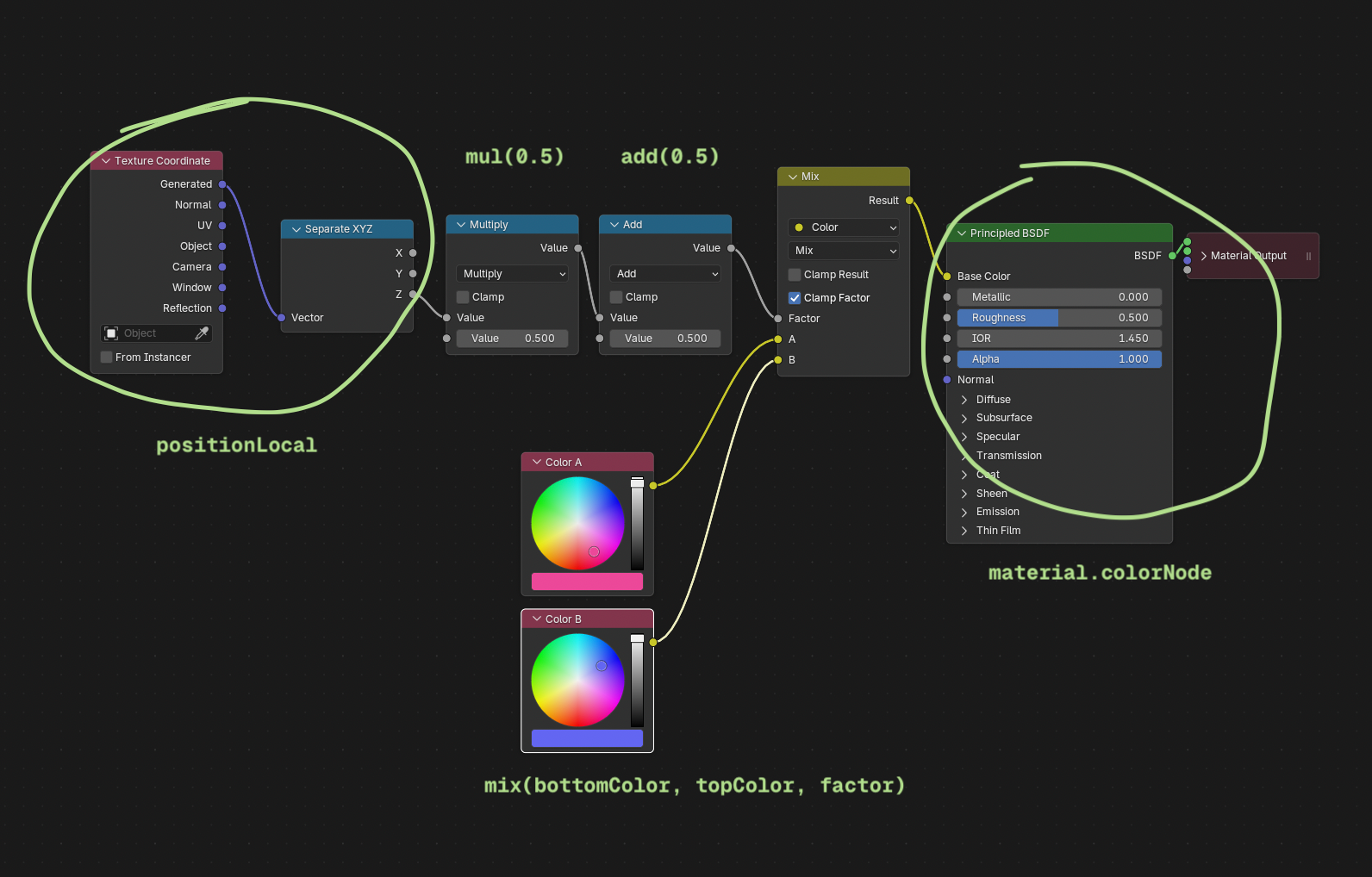
positionLocal.y but corresponds to the Z output in Blender's Separate XYZ node.If we look closely, we can do a 1:1 mapping with our TSL code:
| Blender Node | TSL |
|---|---|
| Texture Coordinate (Object) → Separate XYZ → Z | positionLocal.y |
| Multiply (× 0.5) | .mul(0.5) |
| Add (+ 0.5) | .add(0.5) |
| Color A (#ec4899) | bottomColor |
| Color B (#6366f1) | topColor |
| Mix → Factor | mix(bottomColor, topColor, factor) |
| Principled BSDF → Base Color | material.colorNode = |
Animating with TSL
Here's where things get really fun.
TSL has built-in time utilities, so adding animation is just... adding a node.
import { mix, positionLocal, sin, time, uniform } from 'three/tsl'
import { Color, MeshStandardNodeMaterial } from 'three/webgpu'

const material = new MeshStandardNodeMaterial()

const topColor = uniform(new Color('#6366f1'))
const bottomColor = uniform(new Color('#ec4899'))

const t = time.mul(0.8)
// Animate the gradient factor
const factor = sin(positionLocal.y.add(t).mul(0.5).add(0.5))

material.colorNode = mix(bottomColor, topColor, factor)
time is a built-in node that updates with elapsed time automatically. No requestAnimationFrame loop, no manually pushing uniform values every frame. The shader handles it.
Displacing vertices
colorNode isn't the only output node you can drive. positionNode lets you displace vertices directly on the GPU:
import { cos, positionLocal, sin, time, vec3 } from 'three/tsl'
import { MeshStandardNodeMaterial } from 'three/webgpu'

const material = new MeshStandardNodeMaterial()

const t = time.mul(0.8)
const freq = positionLocal.y.mul(Math.PI)

material.positionNode = vec3(
  positionLocal.x.add(sin(freq.add(t)).mul(0.1)),
  positionLocal.y,
  positionLocal.z.add(cos(freq.add(t)).mul(0.1)),
)
Each vertex wobbles on the XZ plane — sin drives X, cos drives Z at 90° offset, so the motion traces a circular path. No geometry rebuild, no CPU loop. Pure GPU.
A few other output nodes worth knowing:
emissiveNode— self-illumination colorroughnessNode— per-pixel roughnessnormalNode— custom normals
Does it work without WebGPU?
Good news — yes.
TSL compiles to WGSL when using WebGPURenderer and falls back to GLSL when using WebGLRenderer. Same node graph, both renderers. You write it once, Three.js figures out the rest.
Import from
three/webgpu (not three) to get the node-aware versions of renderers and materials. WebGPURenderer handles the fallback to WebGL automatically if the browser doesn't support WebGPU.Prefer the video version?
If you'd rather watch than read, here's the video version of this article: