Creating a Grass Field with TSL 🌱
Stylized grass is one of those effects that instantly sells a game world. Think of the rolling meadows in Zelda: Breath of the Wild or any Studio Ghibli frame: thousands of simple blades, swaying and catching light, with barely any geometric detail per blade.
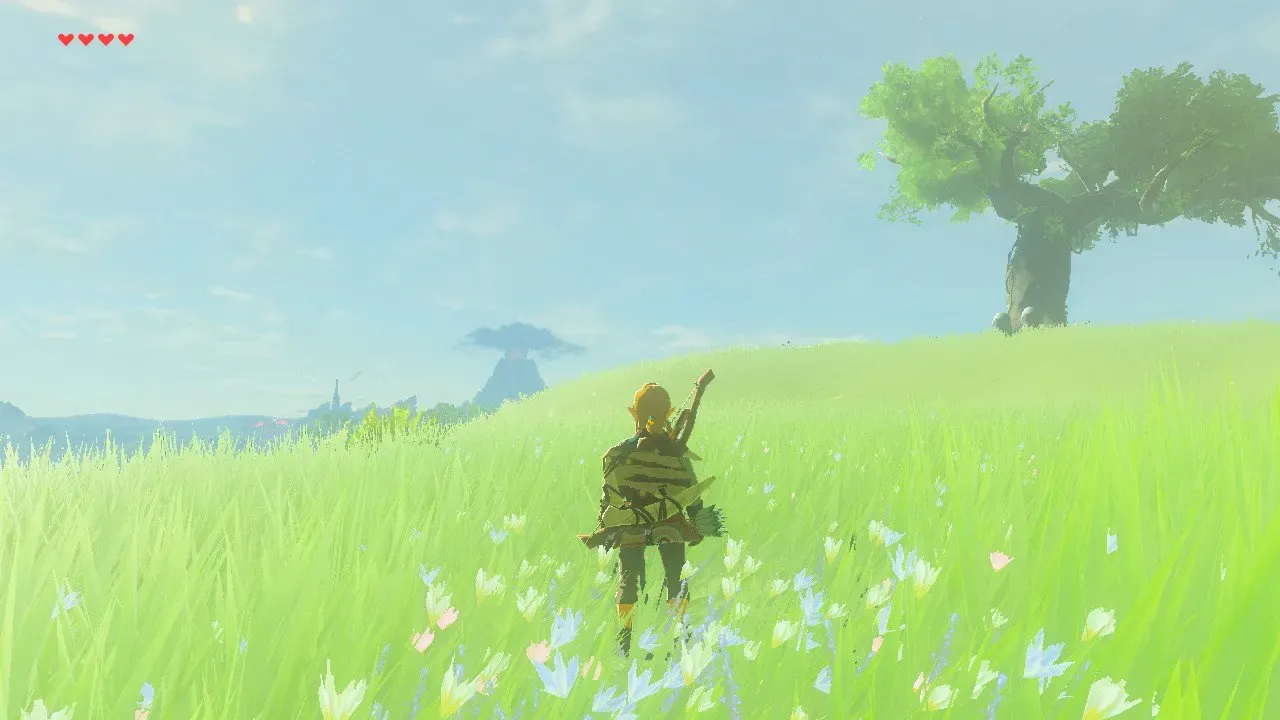
In this post we'll build a field like that with ThreeJS TSL, and we'll do it twice: first the naive way, one triangle per blade, then the way I actually ship it in my RPG project, with instancing and a diffuse map.
The naive version is worth building first. It introduces every trick the final version relies on, and hitting its limits is the best way to understand why the instanced version is shaped the way it is.
This technique stands on two great references: Making grass with triangles in GLSL by Antaeus AR and Bruno Simon's folio-2025 grass. Both are GLSL; here we'll translate the ideas to TSL and push them further.
Part 1: A Triangle Per Blade
The anchor trick
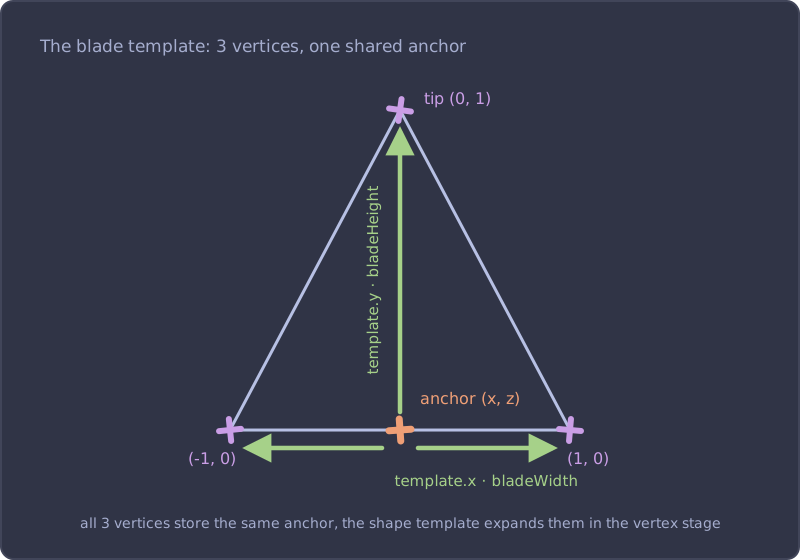
A grass field is thousands of blades, but we want one draw call. The classic trick: create a single BufferGeometry with 3 vertices per blade, but don't store actual vertex positions in it. Instead, all 3 vertices of a blade store the same value: the point on the ground where the blade is planted. I'll call it the anchor.
function createGrassGeometry(subdivisions: number, size: number) {
  const count = subdivisions * subdivisions
  const fragmentSize = size / subdivisions
  const anchors = new Float32Array(count * 3 * 2) // 3 verts × (x, z)
  const heightRandomness = new Float32Array(count * 3)

  for (let iX = 0; iX < subdivisions; iX++) {
    for (let iZ = 0; iZ < subdivisions; iZ++) {
      const i = iX * subdivisions + iZ

      // cell center + jitter — all 3 verts share the SAME anchor
      const x = (iX + 0.5) / subdivisions * size - size / 2 + (Math.random() - 0.5) * fragmentSize
      const z = (iZ + 0.5) / subdivisions * size - size / 2 + (Math.random() - 0.5) * fragmentSize

      for (let v = 0; v < 3; v++) {
        anchors[i * 6 + v * 2] = x
        anchors[i * 6 + v * 2 + 1] = z
        heightRandomness[i * 3 + v] = Math.random()
      }
    }
  }

  const geometry = new BufferGeometry()
  geometry.setAttribute('position', new BufferAttribute(anchors, 2)) // itemSize 2!
  geometry.setAttribute('heightRandomness', new BufferAttribute(heightRandomness, 1))
  // position doesn't hold real positions anymore, so bounds must be set by hand
  geometry.boundingSphere = new Sphere(new Vector3(), (size / 2) * Math.SQRT2 + 2)
  return geometry
}
Two things to notice:
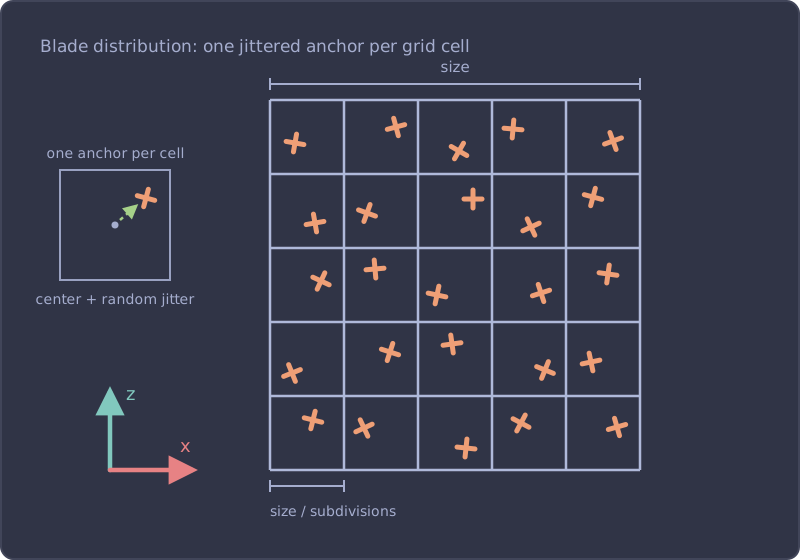
- Blades are distributed on a grid (
subdivisions × subdivisions), one per cell, jittered inside the cell. This guarantees even coverage with no clumps or bald patches, and it's cheap: no need to check distances between blades or re-roll positions. - The
positionattribute has itemSize 2. It only stores(x, z). Three.js doesn't mind, as long as we compute the real position ourselves in the vertex stage, and set a bounding sphere manually since it can't be derived from fake positions.
The actual triangle is expanded in the vertex stage. A tiny uniformArray holds the blade's silhouette as 2D offsets, and each vertex figures out which corner it is with vertexIndex.mod(3):
const bladeWidth = uniform(0.1)
const bladeHeight = uniform(0.6)
const bladeShape = uniformArray([
  new Vector2(0, 1), // tip
  new Vector2(1, 0), // bottom-right
  new Vector2(-1, 0), // bottom-left
], 'vec2')

const material = new MeshBasicNodeMaterial()
material.side = DoubleSide

material.positionNode = Fn(() => {
  const anchor = attribute('position', 'vec2')
  const vertexLoopIndex = vertexIndex.toFloat().mod(3) // 0, 1, 2, 0, 1, 2…
  const template = bladeShape.element(vertexLoopIndex.toInt())

  return vec3(
    anchor.x.add(template.x.mul(bladeWidth)),
    template.y.mul(bladeHeight),
    anchor.y,
  )
})()
Every vertex starts at its anchor and offsets itself sideways and up according to the shape template. One draw call, and the blade shape is still editable at runtime because it lives in a uniform.
The demo below is deliberately sparse so you can read the structure. Toggle the wireframe: every blade is a single triangle standing on its anchor. From here on we crank subdivisions up to 100, which is 10,000 triangles from this same single BufferGeometry.
Height variation
Uniform height reads as plastic turf. Two frequencies of variation fix that: a per-blade random (every blade slightly different from its neighbor) and a low-frequency noise (patches of taller and shorter grass across the field):
const bladeHeightRandomness = uniform(0.6)

const heightRand = attribute('heightRandomness', 'float')
const heightVariation = mx_noise_float(anchor.mul(0.35)).mul(0.5).add(1) // [0.5, 1.5]
const height = bladeHeight
  .mul(mix(1, heightRand, bladeHeightRandomness))
  .mul(heightVariation)
mx_noise_float returns roughly [-1, 1], so .mul(0.5).add(1) remaps it to [0.5, 1.5]: patches half as tall up to 50% taller. The 0.35 scale controls the patch size (roughly 1 / scale world units), tune it to your field size — too low and the whole field samples a flat slice of the noise, and the patches disappear.
Color and fake ambient occlusion
For color, the blade doesn't have its own identity, it inherits the ground color under it. We define the ground color procedurally, as a noise-driven mix between two greens, and evaluate it at the anchor:
const shadowIntensity = uniform(0.5)

const groundColor = Fn(([worldXZ]) => {
  const variation = mx_noise_float(worldXZ.mul(0.25)).mul(0.5).add(0.5)
  return mix(colorA, colorB, variation)
})

material.colorNode = Fn(() => {
  const vertexLoopIndex = varying(vertexIndex.toFloat().mod(3))
  const tipness = varying(step(vertexLoopIndex, 0.5)) // 1 on the tip vertex
  const worldXZ = varying(attribute('position', 'vec2'))

  const base = groundColor(worldXZ)
  const ao = tipness.oneMinus().mul(shadowIntensity)
  return mix(base, base.mul(0.35), ao)
})()
The fun part is tipness. It's 1 on the tip vertex and 0 on the two base vertices, a binary value. But because it's passed through a varying, the rasterizer interpolates it across the triangle, and we get a smooth base-to-tip gradient for free. Darkening the base fakes ambient occlusion: dense grass is darker near the soil where light can't reach. It's the single highest-impact line in the whole shader.
If you render the same ground color on a plane underneath, the blades melt into it and the field reads as one continuous surface.
Billboarding
Flat triangles all facing the same way disappear when viewed edge-on. The classic fix is billboarding: rotate every blade around its own base so it always faces the camera.
const pos = vec3(/* …shape from before… */).toVar()

// billboard: rotate around the blade base (anchor), not the origin
const angle = atan(
  anchor.y.sub(cameraPosition.z),
  anchor.x.sub(cameraPosition.x),
).sub(PI.div(2))
pos.xz.assign(rotateUV(pos.xz, angle, anchor))
atan gives the angle from the blade to the camera on the ground plane, and rotateUV rotates the vertex around the anchor. cameraPosition is a built-in TSL node, so this updates every frame without any uniform juggling.
Hitting the Wall
This version looks decent and runs fast. It's also a dead end, and you can see why by orbiting the demo above:
- The field swims. Every blade rotates to face you, so when the camera moves, the whole field visibly reorganizes itself. From above, blades collapse into lines.
- One triangle can't bend. A blade that sways in the wind needs to curve, and a single triangle can only shear. There's no vertex in the middle to displace.
- The GPU repeats work every frame. That
mx_noise_floatfor height patches? It runs per vertex, per frame, for a value that never changes. - Every per-blade feature costs 3×. Want a per-blade yaw? A baked color? You have to duplicate it into all 3 vertices of the blade.
All four problems have the same root: the geometry has no concept of "a blade". It's just a soup of vertices. What we want is to define one blade and stamp it thousands of times, which is exactly what instancing is.
Part 2: The Instanced Blade
One blade, many instances
With InstancedBufferGeometry, the vertex buffer describes a single blade, and a second set of attributes, instanced attributes, holds the per-blade data. The GPU re-runs the blade geometry once per instance, advancing the instanced attributes each time.
Since geometry is now shared, upgrading the blade is nearly free. Let's give it 5 vertices and 3 indexed triangles: a quad with a tip. The mid vertices are what will let blades curve later:
// unit blade in the XY plane: 2 bottom verts, 2 mid at 70% height, 1 tip
const BLADE_POSITIONS = new Float32Array([
  -1, 0, 0, // bottom-left
  1, 0, 0, // bottom-right
  -0.5, 0.7, 0, // mid-left
  0.5, 0.7, 0, // mid-right
  0, 1, 0, // tip
])
const BLADE_TIPNESS = new Float32Array([0, 0, 0.7, 0.7, 1])
const BLADE_INDICES = [0, 1, 2, 1, 3, 2, 2, 3, 4]
tipness is now a real vertex attribute instead of a vertexIndex trick, with intermediate values on the mid vertices. Same AO gradient as before, but sculpted by hand.
The geometry setup moves all per-blade data into InstancedBufferAttributes, and, since it runs once at build time on the CPU, we can bake the noise there too instead of re-evaluating it in the shader:
function createGrassGeometry(subdivisions: number, size: number) {
  const count = subdivisions * subdivisions
  const fragmentSize = size / subdivisions
  const anchors = new Float32Array(count * 2)
  const randoms = new Float32Array(count)
  const yaws = new Float32Array(count)
  // anchor-only noises baked at build time instead of per-vertex in the shader
  const heightNoises = new Float32Array(count)
  const colorNoises = new Float32Array(count)
  const noise = new ImprovedNoise()

  for (let iX = 0; iX < subdivisions; iX++) {
    for (let iZ = 0; iZ < subdivisions; iZ++) {
      const i = iX * subdivisions + iZ

      const x = (iX + 0.5) / subdivisions * size - size / 2 + (Math.random() - 0.5) * fragmentSize
      const z = (iZ + 0.5) / subdivisions * size - size / 2 + (Math.random() - 0.5) * fragmentSize

      anchors[i * 2] = x
      anchors[i * 2 + 1] = z
      randoms[i] = Math.random()
      yaws[i] = Math.random() * Math.PI * 2
      heightNoises[i] = noise.noise(x * 0.35, z * 0.35, 0) * 0.5 + 1
      colorNoises[i] = noise.noise(x * 0.25, z * 0.25, 0) * 0.5 + 0.5
    }
  }

  const geometry = new InstancedBufferGeometry()
  geometry.instanceCount = count
  geometry.setIndex(BLADE_INDICES)
  geometry.setAttribute('position', new BufferAttribute(BLADE_POSITIONS, 3))
  geometry.setAttribute('tipness', new BufferAttribute(BLADE_TIPNESS, 1))
  geometry.setAttribute('anchor', new InstancedBufferAttribute(anchors, 2))
  geometry.setAttribute('random', new InstancedBufferAttribute(randoms, 1))
  geometry.setAttribute('yaw', new InstancedBufferAttribute(yaws, 1))
  geometry.setAttribute('heightNoise', new InstancedBufferAttribute(heightNoises, 1))
  geometry.setAttribute('colorNoise', new InstancedBufferAttribute(colorNoises, 1))
  // real bounds (field half-diagonal + height margin) so frustum culling can skip the draw
  geometry.boundingSphere = new Sphere(new Vector3(), (size / 2) * Math.SQRT2 + 2)
  return geometry
}
Do the maths on memory: v1 stored 3 floats per blade × 3 vertices. Any new per-blade feature multiplies by 3 again. v2 stores the 5-vertex blade once, plus 6 floats per blade, and adding a new per-blade attribute costs exactly one value. On top of that, the bounding sphere is now real, so when the field leaves the camera frustum, Three.js skips the draw entirely.
The vertex stage, revisited
In the shader, positionGeometry now gives us the unit blade's local vertex, and per-blade attributes arrive automatically per instance. No more vertexIndex arithmetic. And instead of billboarding, each blade gets a random fixed yaw, with DoubleSide making sure it's visible from both sides:
material.positionNode = Fn(() => {
  const anchor = attribute('anchor', 'vec2')
  const random = attribute('random', 'float')
  const yaw = attribute('yaw', 'float')

  const height = bladeHeight
    .mul(mix(1, random, bladeHeightRandomness))
    .mul(attribute('heightNoise', 'float'))

  // unit blade → world scale, spun around its own base by the per-blade yaw
  const local = vec3(
    positionGeometry.x.mul(bladeWidth),
    positionGeometry.y.mul(height),
    0,
  ).toVar()
  local.xz.assign(rotateUV(local.xz, yaw, vec2(0)))

  return vec3(local.x.add(anchor.x), local.y, local.z.add(anchor.y))
})()
The field stops swimming: blades keep their orientation while the camera orbits, and the random yaw distribution means you always see a believable mix of face-on and edge-on blades.
A diffuse map for the ground
Procedural two-color noise is fine, but the real unlock is sampling an actual texture: dirt paths, scorched patches, painted splat maps from your level editor, anything. The blade keeps inheriting the ground color, we just change where that color comes from.
The anchor lives in world units [-size/2, size/2], so remapping it to [0, 1] gives us a UV into a field-sized texture:
// anchor ∈ [-size/2, size/2] → normalized field UV [0, 1]
const diffuseNode = texture(diffuseMap, anchor.div(size).add(0.5))

material.colorNode = Fn(() => {
  // sampled at the anchor only → constant across the blade (flat color per blade)
  const base = varying(diffuseNode ?? mix(colorA, colorB, attribute('colorNoise', 'float')))
  const ao = varying(attribute('tipness', 'float')).oneMinus().mul(shadowIntensity)
  return mix(base, base.mul(0.35), ao)
})()
Wrapping the sample in varying forces it to be evaluated in the vertex stage, once per vertex instead of once per fragment. And since the UV comes from the anchor, which is constant per instance, every fragment of a blade gets the same flat color. That flatness is a feature: it's what gives the field its stylized, painterly look. Render the same texture on the ground plane and the blades become an extension of the terrain.
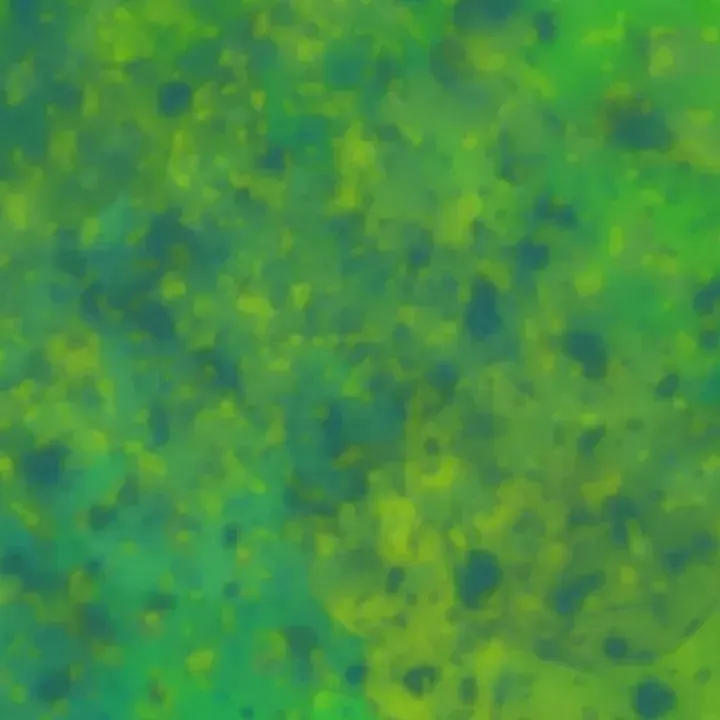
This is the map the demo below samples, a soft hand-painted mix of greens; every blade picks the single color under its anchor:
The Complete Material
Everything together, as a reusable function:
import { BufferAttribute, Color, DoubleSide, InstancedBufferAttribute, InstancedBufferGeometry, Sphere, Vector3 } from 'three'
import { attribute, Fn, mix, positionGeometry, rotateUV, texture, uniform, varying, vec2, vec3 } from 'three/tsl'
import { MeshBasicNodeMaterial } from 'three/webgpu'
import { ImprovedNoise } from 'three/examples/jsm/math/ImprovedNoise.js'

const bladeWidth = uniform(0.1)
const bladeHeight = uniform(0.6)
const bladeHeightRandomness = uniform(0.6)
const shadowIntensity = uniform(0.5)

export function createGrass({ subdivisions, size, colorA, colorB, diffuseMap }) {
  const geometry = createGrassGeometry(subdivisions, size) // from above

  const colorAUniform = uniform(new Color(colorA))
  const colorBUniform = uniform(new Color(colorB))
  const anchor = attribute('anchor', 'vec2')
  const diffuseNode = diffuseMap
    ? texture(diffuseMap, anchor.div(size).add(0.5))
    : null

  const material = new MeshBasicNodeMaterial()
  material.side = DoubleSide

  material.positionNode = Fn(() => {
    const random = attribute('random', 'float')
    const yaw = attribute('yaw', 'float')

    const height = bladeHeight
      .mul(mix(1, random, bladeHeightRandomness))
      .mul(attribute('heightNoise', 'float'))

    const local = vec3(
      positionGeometry.x.mul(bladeWidth),
      positionGeometry.y.mul(height),
      0,
    ).toVar()
    local.xz.assign(rotateUV(local.xz, yaw, vec2(0)))

    return vec3(local.x.add(anchor.x), local.y, local.z.add(anchor.y))
  })()

  material.colorNode = Fn(() => {
    const base = varying(diffuseNode ?? mix(colorAUniform, colorBUniform, attribute('colorNoise', 'float')))
    const ao = varying(attribute('tipness', 'float')).oneMinus().mul(shadowIntensity)
    return mix(base, base.mul(0.35), ao)
  })()

  return { geometry, material }
}
In my game engine this lives inside a  TresJS component, so a whole field is just
 <Grass :subdivisions="200" :size="30" :diffuse-map="splatMap" />, but the geometry and material code is exactly what you see here.
What's Next: Wind
Notice that tipness attribute we sculpted into the blade, 0 at the base, 0.7 at the mid vertices, 1 at the tip? It has a second job. If you displace each vertex horizontally proportionally to it, the base stays planted, the middle leans, and the tip travels furthest: the blade bends instead of shearing. That's the entire foundation of grass wind, and together with a scrolling noise field and a trample system (characters flattening the grass they walk through), it's what the next post is about.
Resources
- Making grass with triangles in GLSL using Three.js, the article that introduced me to the anchor trick
- Bruno Simon's folio-2025 Grass.js, a beautiful production GLSL implementation
- Three.js TSL documentation
- Intro to TSL, if node-based shaders are new to you